What a clean slug actually does
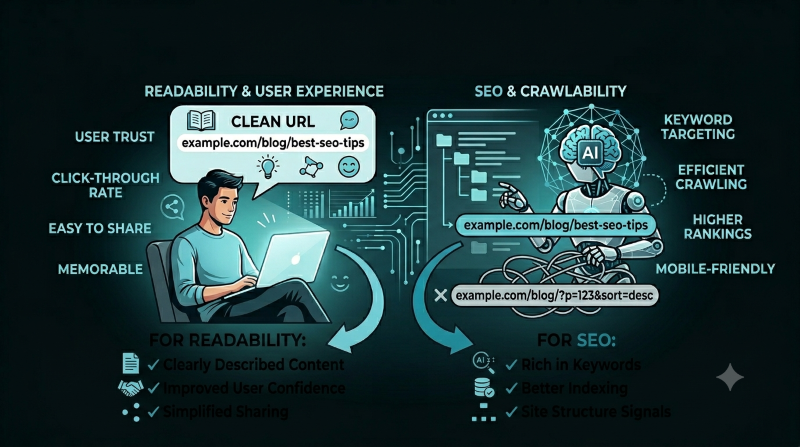
A clean URL slug turns a page title into a simple path. Instead of a long string of punctuation, dates, tracking text, or unreadable IDs, the slug explains the page in a few useful words. For a post titled "Why Clean URL Slugs Matter for SEO and Readability," a clear slug is something like why-clean-url-slugs-matter. It is easier to scan, easier to share, and easier to recognize inside your content management system.
Slugs are small, but they sit in places readers notice: search results, browser address bars, shared messages, analytics reports, internal links, and documentation. A clean slug does not replace good content, helpful titles, or strong page structure, but it supports all of them. It gives the page a stable, human-readable identity.
/blog/post?id=8427&title=why%20clean%20url%20slugs%20matter
Cleaner: /blog/posts/why-clean-url-slugs-matter/
Readable links earn more trust
People often decide whether a link is relevant before they open it. A readable slug gives them a quick signal. If someone sees a link ending in calculate-ai-api-cost, they can guess the destination immediately. If they see random numbers or a path full of symbols, they have to trust the surrounding text more. That friction is small, but small friction appears repeatedly across search, social sharing, email, chat, and internal navigation.
Clean slugs are especially helpful when links are pasted without rich previews. In team chats, spreadsheets, notes, tickets, and documentation, the URL itself may be the only context. A descriptive slug lets a reader identify the page without opening ten tabs to check.
Create clean slugs in seconds
Paste a title, choose your separator and case style, remove stop words or duplicates, and generate readable slug variants for blog posts, product pages, files, and documentation.
Open Generate Slug ToolSEO benefits come from clarity and consistency
A good slug can reinforce the topic of a page, but it should be treated as one part of a larger SEO-friendly page. Search engines look at many signals: page content, title tags, headings, internal links, site structure, performance, and usefulness. The slug is not a magic ranking lever. Its real value is clarity. It aligns the URL with the page topic and gives both readers and systems a clean label for the content.
Consistency also matters. If every blog post follows the same pattern, your site is easier to crawl, audit, redirect, and maintain. For example, a blog might use /blog/posts/topic-name/, product pages might use /products/product-name/, and documentation might use /docs/category/page-name/. A predictable pattern helps everyone who works with the site.
Slug patterns make a site easier to operate
As a site grows, URL decisions become operational decisions. A small site can survive a few inconsistent paths, but a larger site needs rules. If one article lives under /blog/, another under /posts/, and another under a date folder that is never used again, the structure becomes harder to explain and maintain. A clean slug works best inside a clean pattern.
Think of the folder path and the slug as two separate choices. The folder path tells people what type of page it is: blog post, tool, product, category, documentation, or landing page. The slug tells people what the individual page is about. On FreeTextToolsPro, a tool can use a direct path such as /generate-slug/, while a blog article can use a more specific path such as /blog/posts/why-clean-url-slugs-matter/. That difference is helpful because tools and articles serve different purposes.
Clear patterns also help teams write internal links. Writers do not have to guess where content belongs. Developers can create templates with confidence. SEO checks become easier because you can scan URLs and quickly see whether a page is in the right section. Even when you are the only person managing the site, consistent patterns save time because future-you does not need to decode old decisions.
Short is useful, but vague is not
The best slug is usually shorter than the full title but still specific enough to identify the page. Removing filler words can help, but removing too much can make the slug unclear. For example, url-slugs is short, but why-clean-url-slugs-matter tells readers more. Good slug writing is a balance between brevity and meaning.
Hyphens are the safest default for public URLs because they create visible word breaks. Lowercase is also a practical default because it avoids confusion between paths that look similar but may behave differently on some systems. Avoid special characters, excessive punctuation, repeated words, and terms that will feel outdated quickly unless the date or version is essential to the page.
Common slug mistakes to avoid
One common mistake is leaving the full title exactly as written, including extra words that do not help the reader. A title can be conversational, but a slug should be compact. Another mistake is using temporary wording. If a page is called new-ai-cost-guide, it will stop feeling new. If the same page uses calculate-ai-api-cost, the path stays useful for longer.
Dates can be helpful for news, reports, or content where freshness is the main point. But for evergreen guides, dates can create maintenance problems. A slug like best-writing-tools-2026 may be correct for a yearly roundup, but it is awkward for a guide you plan to update continuously. Before adding a date, ask whether the date helps readers understand the page or only reflects when you first wrote it.
Keyword stuffing is another trap. A slug should not repeat every possible search phrase. Long paths like best-free-online-seo-url-slug-generator-clean-url-slugs feel unnatural and are hard to share. Choose the main phrase that identifies the page and let the title, headings, and body content carry the richer detail.
Slugs affect maintenance after publishing
Changing a slug after publication can break links if redirects are not handled properly. That is why it is worth choosing a clean slug before a page goes live. When you do need to change one, add a redirect from the old URL to the new URL and update internal links. This protects readers, bookmarks, analytics continuity, and search visibility.
For large sites, clean slugs also make reporting easier. When analytics, logs, or crawl reports show readable paths, you can understand problems faster. A list of pages like /blog/posts/how-to-calculate-ai-api-cost/ and /generate-slug/ is far easier to audit than a list of random IDs.
When changing a slug is worth it
Because slug changes need redirects, you should not rename URLs casually. Still, there are times when changing a slug is the right decision. If the current slug is misleading, full of accidental characters, tied to an old product name, or impossible to understand, a cleaner path can improve the long-term health of the site. The key is to treat the change like a migration, not a quick edit.
Before changing a published slug, list every internal link that points to the old path. Update navigation, blog cards, related tool links, sitemap entries, canonical tags, and any hard-coded references. Then create a redirect from the old URL to the new one. After publishing, test both paths. The old one should take readers to the new page, and the new one should load normally with the correct canonical URL.
Analytics also need attention. If you compare traffic before and after a slug change, remember that the page path has changed. Document the date of the update so future reporting makes sense. A clean migration protects the reader experience and keeps your own data from becoming confusing.
Slugs are useful beyond blog URLs
The same naming discipline works in other parts of a digital workflow. Product handles, downloadable file names, image names, documentation anchors, campaign labels, and internal IDs all benefit from readable slugs. A file named ai-api-cost-guide-draft.pdf is easier to recognize than final-v3-new-copy-2.pdf. A documentation anchor named #pricing-assumptions is easier to share than a random generated ID.
This is where a slug generator is useful even if you are not publishing a blog post. You can paste a headline, product name, feature label, or file title into the Generate Slug tool and quickly create a clean version. The separator controls let you use hyphens for public URLs, underscores for some file workflows, dots for technical naming, or camelCase and PascalCase for code-friendly identifiers.
A practical slug checklist
- Use a few descriptive words that match the page topic.
- Use lowercase letters for public URLs.
- Separate words with hyphens.
- Remove unnecessary punctuation and repeated words.
- Avoid changing published slugs unless you can add redirects.
- Keep patterns consistent across blogs, tools, products, and docs.
A simple workflow before publishing
Start with the page title, then remove words that do not identify the topic. Convert the remaining words to lowercase, separate them with hyphens, and read the result out loud. If the slug still explains the page without the title nearby, it is probably strong. If it feels vague, add one specific word. If it feels crowded, remove a word that repeats the same idea.
Next, compare the slug with similar pages on the site. If the page belongs in a category, make sure the folder path reflects that category. If another page already uses a similar slug, make this one more precise. Duplicate or near-duplicate slugs can confuse editors and readers, especially when two guides cover related topics.
Finally, check the full URL on a narrow screen. Mobile users often see less of a link, so the most meaningful words should appear early. A clean slug is not only about search; it is about making the page understandable wherever the link appears.
A clean slug is a quiet improvement, but quiet improvements compound. It makes links easier to trust, pages easier to manage, and content easier to share. When every page gets a clear path, your site feels more organized from the outside and becomes easier to operate from the inside. That is the real value of slug discipline: it reduces friction for readers, publishers, developers, and anyone who has to understand the site later.