
Start by understanding what you are reducing
Reducing AI token usage sounds simple until you look at a real application. A prompt is rarely only the text a user types. It may include system instructions, developer instructions, previous chat turns, retrieved knowledge base passages, examples, formatting rules, tool descriptions, user profile data, and the model's response. Every part of that exchange can consume tokens. If you only shorten the visible user message, you may miss the larger source of cost.
A useful mental model is to divide token usage into three areas: instructions, context, and output. Instructions tell the model how to behave. Context gives the model the information needed for the task. Output is the answer you ask the model to write. Token optimization works best when you examine each area separately. A long instruction may be wasteful, but a long customer transcript may be necessary. A huge output limit may be unnecessary for a quick classification, but essential for a detailed report.
Before changing prompts, get a baseline. Paste realistic samples into the Word and Token Counter and record the approximate input size. Then estimate the likely response size. If the workflow will run through an API, put those numbers into the AI API Cost Calculator to see how token savings translate into monthly savings. Optimization becomes much easier when you can measure the before and after.
Do not confuse shorter with better
The cheapest prompt is not automatically the best prompt. If you remove information the model needs, you may cause low-quality answers, hallucinated details, failed formatting, or repeated retries. Those retries can consume more tokens than the original prompt would have used. A good token strategy removes noise while protecting signal.
Think of tokens as a budget you spend on clarity. A few precise rules can save many tokens compared with a long, repetitive instruction block. One high-quality example may be more useful than five average examples. A short summary of old chat history may preserve the important facts better than sending every previous message. The best savings usually come from structure, not from simply deleting words until the prompt becomes vague.
Quality checks are important because token reduction can introduce hidden damage. Test the shorter prompt with common cases, long cases, confusing cases, and edge cases. Compare accuracy, tone, formatting, completeness, and latency. If the new prompt is cheaper but users need to ask follow-up questions to fix the answer, the real token usage may not improve. A successful reduction makes the workflow cheaper and easier to use at the same time.
Clean up repeated instructions
Repeated instructions are one of the easiest places to save tokens. Many prompts grow slowly over time. A developer adds a tone rule. A product manager adds a safety note. A support lead adds a formatting requirement. Later, someone adds the same idea in different words because they are not sure whether the earlier line is enough. After a few iterations, the prompt contains three versions of the same rule and the model pays attention to all of them.
Review the instruction block line by line. Merge overlapping rules. Remove explanations meant for humans if the model only needs the final instruction. Replace broad wording with specific constraints. For example, instead of writing several sentences about being concise, polite, direct, helpful, and not too verbose, you may be able to say, "Answer in a helpful tone using no more than five short bullet points." That is shorter and more testable.
Be careful with negative rules. A long list of things the model should not do can become expensive and confusing. Where possible, phrase the desired behavior positively. Instead of "Do not write a long introduction, do not repeat the user's question, and do not add a conclusion," try "Start with the answer and keep the response under 120 words." The model receives a clearer target and the prompt uses fewer tokens.
Check prompt size before shipping
Paste your system prompt, examples, user text, and expected answer into the counter to understand whether your workflow is small, moderate, or growing too quickly.
Open Word and Token CounterSend only the context that matters
Context is often the largest part of an AI request. In a chatbot, context may be previous messages. In a document tool, it may be file content. In a support assistant, it may be customer details, ticket history, product rules, and knowledge base snippets. More context can help when it is relevant. More context can hurt when it is noisy, outdated, contradictory, or only loosely connected to the current task.
The first question is simple: does the model need this exact text to complete this specific request? If the answer is no, do not send it. If the model needs the idea but not the exact words, summarize it. If it needs only one part of a document, retrieve that part instead of sending the whole document. If it needs recent chat history but not the entire conversation, keep the last few turns plus a summary of older decisions.
Retrieval workflows need special attention. It is tempting to send many document chunks to be safe, but weakly related chunks can dilute the answer and increase cost. Tune retrieval so it prefers fewer, stronger passages. Include titles, section names, or short metadata only when they help the model understand the source. If two chunks say the same thing, choose the clearer one. Token reduction in retrieval is not only about budget; it can improve answer focus.

Use summaries for old history
Long conversations become expensive because every new message may carry old turns forward. Some history is useful. The model may need user preferences, decisions already made, constraints, and unresolved questions. But it rarely needs every greeting, correction, hesitation, and repeated explanation from the start of the chat.
A practical approach is to keep recent turns in full and compress older turns into a running summary. The summary should preserve facts, preferences, decisions, names, deadlines, and open tasks. It should remove conversational filler and outdated details. When the conversation moves into a new topic, start a fresh summary for the new thread instead of dragging unrelated history along.
Summaries should be checked like any other prompt component. If the summary loses an important detail, the model may make mistakes. If the summary becomes too long, it stops solving the problem. A good summary is compact, structured, and written for the next model call, not for a human reading a transcript. It says what the model needs to know now.
Limit output with intent
Output tokens can quietly become the expensive half of a workflow. If your prompt asks for "a detailed answer," the model may generate more text than the user needs. If the API call allows a very large maximum output, rare responses may become surprisingly long. The right output limit depends on the job. A label, category, or score should be tiny. A product description needs more room. A full article rewrite needs much more.
Set response expectations in the prompt, not only in the API parameter. The model should know the shape of the answer: one sentence, three bullets, a compact table, JSON with specific fields, or a short paragraph followed by next steps. Then set the technical maximum high enough for the answer to finish but low enough to prevent drifting. This protects cost and makes the user experience more predictable.
A helpful technique is to define different output profiles. For example, a support assistant might use "brief," "standard," and "detailed" modes. Most questions receive brief or standard answers. Detailed answers are reserved for complex issues where extra explanation improves the outcome. This is better than giving every request a large output budget by default.
Choose examples carefully
Examples can make prompts much better. They show tone, structure, classification rules, and edge-case behavior. They also consume input tokens every time you send them. If your prompt includes examples, test how many are truly needed. Sometimes one excellent example beats several repetitive examples. Sometimes a compact schema or rule table can replace long demonstrations.
Keep examples close to the real task. A support assistant should not carry examples for scenarios it never sees. A title generator should not include long examples when short title pairs would teach the pattern. A data extraction workflow should include edge cases only if those edge cases are common enough or risky enough to justify the token cost.
You can also move stable examples into a fine-tuned model or another system design if your volume justifies it, but that is not always necessary. For many teams, the best first step is simply trimming examples to the smallest set that still protects quality. Measure the prompt before and after each example change so the savings are visible.
Break complex workflows into smaller calls only when it helps
Splitting work into multiple AI calls can either save tokens or waste them. It saves tokens when a small, cheap step prevents a large, unnecessary step. For example, a classifier can decide whether a request needs retrieval before the app sends document chunks. A short router can choose between a simple answer and a detailed analysis. A preprocessor can extract only the relevant part of a long message.
But splitting can waste tokens if each step repeats the same long instructions and context. A chain of five calls may cost more than one well-designed call. The decision should be based on measurement. Count the whole workflow, not just each individual request. If a split reduces average token usage, latency, or errors, keep it. If it only adds complexity, simplify.
For high-volume products, a hybrid design often works well. Use deterministic code for tasks that do not need a model: trimming whitespace, deduplicating text, validating JSON, extracting obvious fields, counting words, or enforcing length limits. Then reserve AI calls for judgment, generation, reasoning, or language tasks where the model adds real value.
Remove duplicated source text
Users often paste messy content: repeated paragraphs, email chains, quoted replies, signatures, tracking footers, boilerplate disclaimers, and copied navigation text from web pages. If your app sends all of that directly to the model, token usage rises without improving the answer. Pre-cleaning can be a quiet but powerful optimization.
For text-heavy workflows, remove exact duplicates, irrelevant headers, repeated legal footers, and empty lines before sending content to the model. If your product extracts text from HTML, JSON, XML, or documents, keep the meaningful content and discard structural noise where possible. The goal is not to alter the user's meaning. The goal is to stop paying the model to read clutter.
FreeTextToolsPro includes extractor and counter tools that can help with manual cleanup when you are preparing sample prompts or testing a workflow. For production apps, similar cleanup can be built into the pipeline so users do not have to think about token hygiene.
Watch numbers, code, tables, and URLs
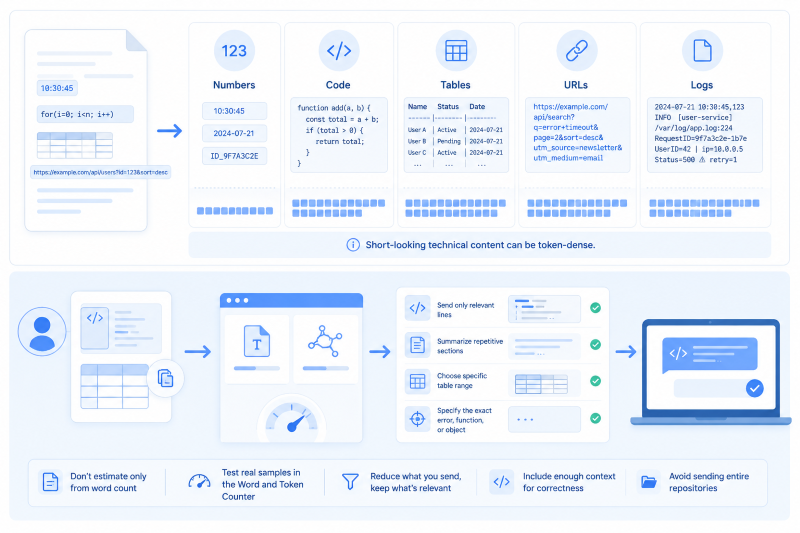
Some text formats consume more tokens than they appear to. Code includes punctuation, indentation, operators, brackets, and variable names. Tables repeat separators and column names. URLs include slashes, dots, query strings, encoded characters, and tracking parameters. Logs include timestamps, file paths, IDs, and symbols. A short-looking technical input can become token-dense.
When your users paste technical content, do not estimate only from word count. Test real samples in the Word and Token Counter. If the content is too large, consider sending only the relevant lines, summarizing repetitive sections, or asking the user to choose the specific error, function, or table range they want analyzed. For code tasks, include enough surrounding context for correctness, but avoid sending entire repositories when one file or function is enough.
Use model choice as a token strategy
Token reduction is not only about prompt length. Model choice also matters. A smaller or cheaper model may be enough for classification, cleanup, routing, short extraction, or simple rewriting. A stronger model may be better for complex reasoning, long-form synthesis, high-stakes answers, or tasks where errors are expensive. Matching the model to the task can reduce cost without forcing every prompt to become smaller.
However, do not choose a cheaper model purely from pricing. If it needs longer prompts, more examples, more retries, or more human correction, the savings may disappear. Test model quality with the shorter prompt you actually plan to use. The right model is the one that meets the quality bar at the best total workflow cost.
Some products use model routing. Easy requests go to a low-cost model. Complex requests go to a stronger model. Failed or uncertain answers are escalated. This can work well, but only if routing itself is reliable and inexpensive. Again, measure the complete path.
Estimate savings before you celebrate them
A prompt that saves 200 tokens may be a major win or a tiny detail depending on volume. If a workflow runs 50 times per month, the savings may not matter much. If it runs 500,000 times per month, even small reductions become important. Cost optimization should focus first on high-volume workflows, long-context workflows, and workflows with large outputs.
Use a simple before-and-after estimate. Count the old input, old output, new input, and new output. Multiply each version by expected daily requests. Then compare monthly cost in the AI API Cost Calculator. This keeps the conversation grounded. Instead of saying "we shortened the prompt," you can say "we reduced the expected monthly token spend for this workflow by this amount while preserving answer quality." That is much easier to prioritize.
Build token checks into the workflow
The best token savings are maintained over time. Prompts tend to grow unless someone watches them. Add a habit of reviewing prompt size whenever you change instructions, add examples, expand retrieval, or change output format. Keep a small set of test cases and compare token usage after each change. If usage increases, make sure the quality improvement is worth it.
For teams, document the token budget for each AI feature. Include the expected input range, output range, model, monthly call volume, and fallback plan. If a prompt grows beyond the budget, it should be a conscious product decision, not an accidental side effect. For solo builders, even a simple note in your project README or planning document can prevent future confusion.
Logging real usage after launch is essential. Estimates are helpful before release, but users will surprise you. Some will paste longer content. Some will regenerate answers. Some will use the feature in a way you did not expect. Track actual input tokens, output tokens, model names, and workflow names so you can tune based on evidence.
A practical checklist
- Count the full prompt, including hidden instructions and examples.
- Remove repeated rules and stale context.
- Summarize old chat history when exact wording is not needed.
- Retrieve fewer, more relevant document chunks.
- Set output length expectations in the prompt and API settings.
- Use deterministic code for cleanup, validation, and simple counting.
- Test cheaper models only against realistic quality requirements.
- Compare monthly cost before and after each meaningful prompt change.
Final takeaway
Reducing AI token usage is not about starving the model. It is about feeding it better. Keep the instructions that guide behavior, the context that matters, and the output length the user actually needs. Remove duplicates, old history, weak examples, irrelevant documents, and unlimited response space. Then measure the result with realistic samples.
Start small: count one real prompt, trim one repeated instruction, shorten one output, or replace old chat history with a useful summary. Use the Word and Token Counter to see the size of your text and the AI API Cost Calculator to translate that size into a budget. Once token usage is visible, optimization stops feeling mysterious. It becomes a normal part of building AI features that are faster, clearer, and more affordable to operate.